
Steps to Author Image Component:
Step 1: This component should be authored inside a Background Container component. Click on drag components here, and click on + icon to add Background Container component on page.

Rich Text Editor





Steps to Author Image Component:
Step 1: This component should be authored inside a Background Container component. Click on drag components here, and click on + icon to add Background Container component on page.

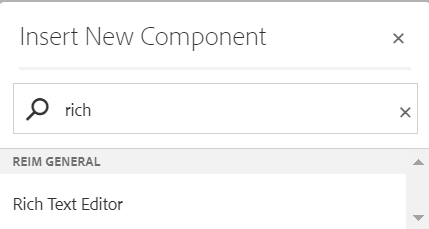
Step 2: Click on newly added "Drag components here" section and click on + icon. Search and select Rich Text Editor component from dropdown list and then drag and drop it onto the desired location on the page.
Step 3: Click on the highlighted icon to configure the component.

Step 4: Author the field in Text tab as shown below:(For Variation 1)

Author the field in Text tab as shown below:(For Variation 2)

Authoring Fields For Varitation 2
| Authoring Field | Description |
| Variations | This is the dropdown field with two values ,Varitaion 1 : If selected user will able to see styling applied for this varitaion and Varitaion 2 : If selected user will able to see custom styling applied for this varitaion |
| Text | It is used to display the text |
| is Wrapping Required? | If checked it will apply the wrapping |
Desktop View:
Authored Rich Text Editor Component V2 Variation
Example: Rich text editor V2 variation
Note