Intake Form
Intake Form
Intake Form
Intake Form
Intake Form

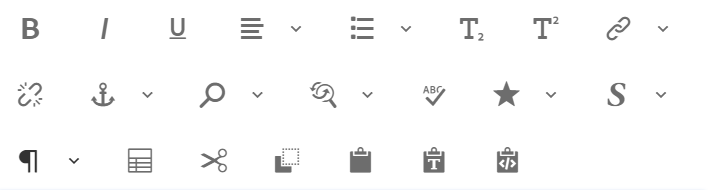
A rich text field is a type of text input that offers various text formatting and alignment options.

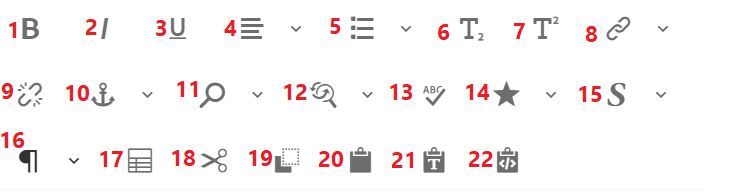
 

  1. Makes the text BOLD.
  2. Makes the text italic.
  3. Adds an underline to the text.
  4. Text can be aligned as Left, Right, Center.
  5. Text can be organized as bullet list, number list, outdent, indent.
  6. Text can be written as subscript.
  7. Text can be written as superscript.
  8. Text can be used as hyperlink , user has the option to add aria label to the link.
  9. Text can be removed as hyperlink.
  10.   Anchor can be used to create hyperlink.
  11.  Text can be searched.
  12.   Text can be replaced.
  13.   Spellings can be checked.
  14.   Special characters can be added.
  15.   Footnotes can be added.
  16.   Paragraph formats can be selected as Heading 1, Heading 2,  Heading 3, Heading 4, Heading 5 and Heading 6.
  17.   Table can be created.
  18.   Text selected can be cut.
  19.   Text can be copied.
  20.   Text can be pasted.
  21.   Paste as text. 
  22.   Paste from Word.

Note:

 
  • All above mentioned options will be different for different components' text field based on the requirement.
  • If the user wants to have space within the lines, then while inserting text “ENTER” can be used. This will insert a <p> tag in rich text.
  • If the user wants to have no space within the lines, then while inserting text “SHIFT + ENTER” can be used. This will insert a <br> tag in rich text with no extra space.

Last updated: August 15, 2023