
Steps to Author Video Listing Component:
Step 1: Click on drag components here, and click on + icon to add the component on page.

Video Listing Component





Steps to Author Video Listing Component:
Step 1: Click on drag components here, and click on + icon to add the component on page.

Step 2: Search and select video listing component from dropdown list and then drag and drop it onto the desired location on the page.

Step 3: Click on the highlighted icon to configure the component.

Step 4: Author the video listing component as shown below.


Authoring Fields
| Authoring Field | Description |
| Variations | It is a dropdown field with two values 1. List View : If selected, videos will display as list and 2. Carousel View : If selected , videos will display as carousel view |
| Author the fields to display the list/card view | It is a multifield with six fields |
| Thumbnail Image | Image can be author from the DAM path |
| is Background Overlay Required? | If Checked and saved Background Overlay is added to the video |
| Alt Text | It is used as a alternative text for images |
| Title | It is used to display the title |
| Description | It is used to display the description |
| Link URL | If author, it will navigate to authored url |
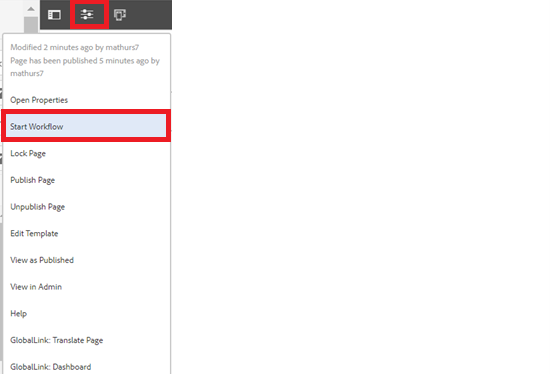
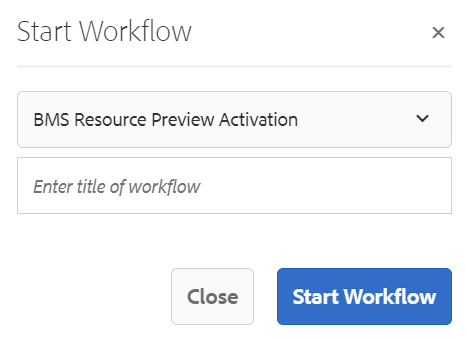
Step 5: After authoring all the fields, start workflow as shown below.
Example : Video Listing (List View)

Advanced Melanoma: What should I expect?
A diagnosis of advanced melanoma can be overwhelming, and difficult for both you and your loved ones to come to terms with. You may have many questions – like what's going to happen next, or how it may impact your life. Find out more in this video.

What is BRAF in melanoma?
What's BRAF in melanoma, and why does it matter? In this video, find out why genetic testing is conducted on your melanoma cells and how it may affect your treatment options.

Understanding my diagnosis
Find out what advanced melanoma is and how it is generally managed.
Example : Video Listing (Carousel View)